
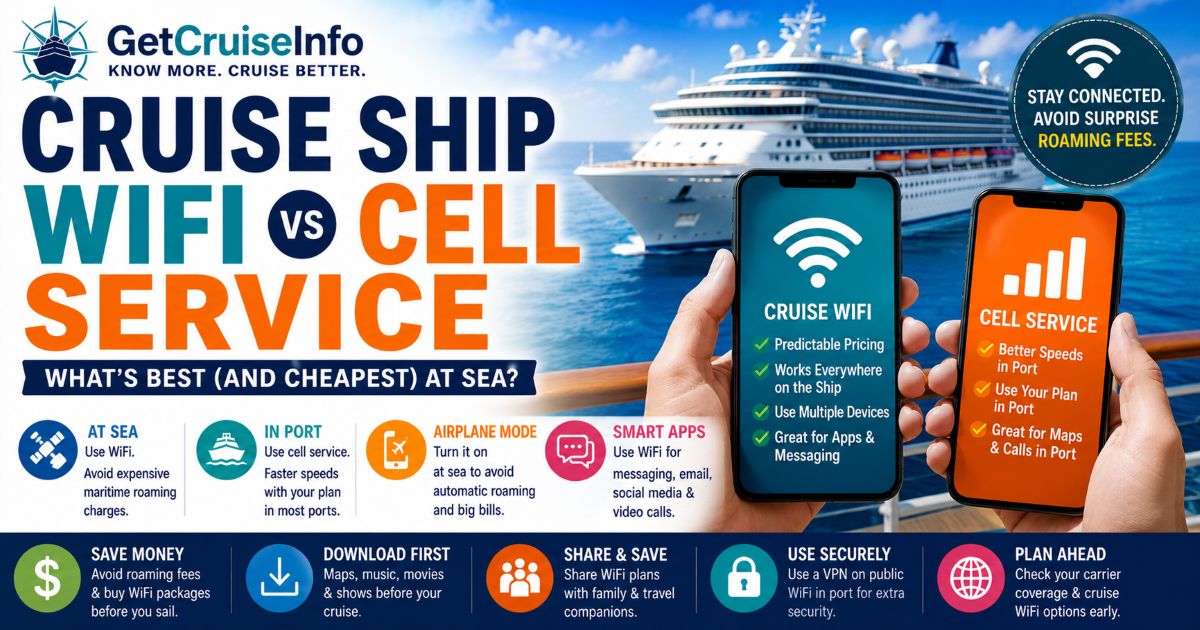
Most Cruise Travelers Don’t Realize Their Phone Can Generate Massive Charges at Sea
Learn how cruise ship WiFi, maritime cellular networks, roaming fees, and port connectivity actually work — including the safest and cheapest ways to stay connected during your cruise.
Most Cruise Travelers Assume Their Phone Will Work Normally at Sea
Many first-time cruisers assume:
- their regular phone plan automatically works on cruises
- international plans cover ship connectivity
- cell service behaves the same way it does on land
In reality, cruise ship connectivity works very differently from:
- hotel WiFi
- domestic cellular networks
- traditional international travel
Understanding:
- maritime roaming
- ship WiFi systems
- port connectivity
- airplane mode strategies
can prevent:
- massive roaming charges
- slow internet frustration
- unexpected cruise expenses
Helpful resources:
Cruise Ship WiFi Has Improved Dramatically — But It Still Has Limits
Modern cruise ships now use:
- satellite internet systems
- low-earth-orbit networks
- ship-wide wireless infrastructure
Some newer ships now offer:
- video streaming
- video calls
- remote work capability
- social media access
However, performance still varies heavily depending on:
- ship technology
- weather
- passenger load
- satellite congestion
Cell Service at Sea Is Usually the Biggest Financial Danger
Once cruise ships leave port, phones often connect to:
- maritime cellular networks
- “Cellular at Sea”
- ship-based roaming systems
These networks are:
- not included in most domestic plans
- not covered by many international packages
Typical maritime roaming charges can include:
| Service Type | Potential Cost |
|---|---|
| Voice Calls | $5–$15 per minute |
| SMS Messages | $2–$5 per message |
| Mobile Data | $10–$25 per MB |
Even small amounts of background data can create:
- massive surprise bills
Airplane Mode Is Usually the Most Important Cruise Technology Rule
- Turn on Airplane Mode before departure
- Use WiFi manually instead of cellular data
- Disable roaming settings
- Avoid automatic maritime network connections
- Use messaging apps over WiFi
- Download entertainment before boarding
Cell Service in Port Usually Works Much Better
Once ships dock, phones typically reconnect to:
- local island networks
- standard roaming partners
- domestic carrier agreements
Many carriers now include destinations such as:
- Mexico
- Bahamas
- Puerto Rico
- U.S. Virgin Islands
within:
- international roaming packages
- premium phone plans
Port connectivity is often:
- faster
- cheaper
- more reliable
than shipboard internet. Many travelers also rely on local cellular service for maps, rideshares, and beach information while exploring European ports. If your itinerary includes coastal destinations, our Best Mediterranean Cruise Beaches guide can help you identify which ports offer the best opportunities for swimming, sunbathing, and relaxing by the sea.
than shipboard internet.
When Cruise WiFi Usually Makes More Sense
Cruise WiFi is often the better option when travelers want:
- predictable pricing
- messaging access
- social media
- remote work access
- multiple connected devices
It also avoids:
- maritime roaming surprises
- background app charges
When Cellular Service Makes More Sense
Using local cellular service in port often works best for:
- short internet sessions
- navigation apps
- maps
- rideshare apps
- quick communication
Many travelers use:
- ship WiFi at sea
- cellular data in port
as the most balanced strategy.
Streaming & Video Calls Depend Heavily on Ship Technology
Older cruise ships may struggle with:
- video streaming
- Zoom calls
- large downloads
Newer ships using:
- Starlink-style low-earth-orbit systems
have improved dramatically.
However, internet quality still depends on:
- weather
- passenger usage
- satellite coverage
- ship positioning
Smart Cruise Travelers Usually Reduce Internet Costs in Multiple Ways
Experienced cruisers often:
- buy WiFi pre-cruise
- share internet plans
- use messaging-only packages
- download content before boarding
- avoid unnecessary streaming
Cruise internet budgeting matters more than many travelers initially realize.
Helpful resources:
Connectivity Also Matters for Cruise Safety & Travel Coordination
Reliable internet access may help with:
- travel updates
- flight changes
- family communication
- emergency coordination
- port navigation
Many travelers now prioritize:
- basic cruise connectivity
even if they are not:
- heavy internet users
The Best Cruise Connectivity Strategy Usually Combines Airplane Mode, WiFi & Smart Port Usage
Most experienced cruisers eventually discover:
- maritime cellular roaming is the real danger
- ship WiFi is usually safer financially
- port cellular service often works best
- airplane mode prevents major mistakes
The best cruise internet strategy is usually the one that balances:
- cost
- convenience
- reliability
- realistic vacation expectations
Frequently Asked Questions
Should travelers use airplane mode on cruises?
Yes. Airplane mode helps prevent expensive maritime roaming charges while still allowing WiFi access.
Is cruise WiFi better than cell service?
At sea, cruise WiFi is usually safer and more predictable financially than maritime cellular roaming.
Can travelers use their phones normally in port?
Often yes, depending on carrier international coverage and roaming agreements.
Does cruise WiFi support messaging apps?
Most modern cruise WiFi systems support iMessage, WhatsApp, Facebook Messenger, and email.
What is the biggest cruise connectivity mistake?
Allowing phones to connect automatically to maritime cellular networks can generate massive roaming bills.
Some links may be affiliate links.
Need Help Comparing Cruise Options?
Compare itineraries, cabin options, cruise lines, and pricing before booking.